Run localhost on your real mobile phone (live testing)

I know somewhen you also would have had a thought that can we run our website or web app on mobile phone even when we are developing it in localhost?
So the answer is yes😍, you can easily run a localhost server on your mobile phone or tablet, or any other device, and believe me this is easy AF!
Note : This trick only going to work if both devices (PC and Mobile Phone) are connected to the same wifi or mobile network.
Step 1 - Run your application/website on localhost and note the Port number
First of all, run your website on localhost with the help of an extension called live server, or if you are creating a web app so just run your React, Vue, or Angular application.
Now run your application on the browser and note down the port number, you will see the port number in the search bar e.g. 5500, 3000

Step 2 - Find your local IP address IPv4
To find your local IP address IPv4 you have to open the command prompt.
(Windows + x and then click the command prompt option)
Now type ipconfig and press enter. You will see something like this
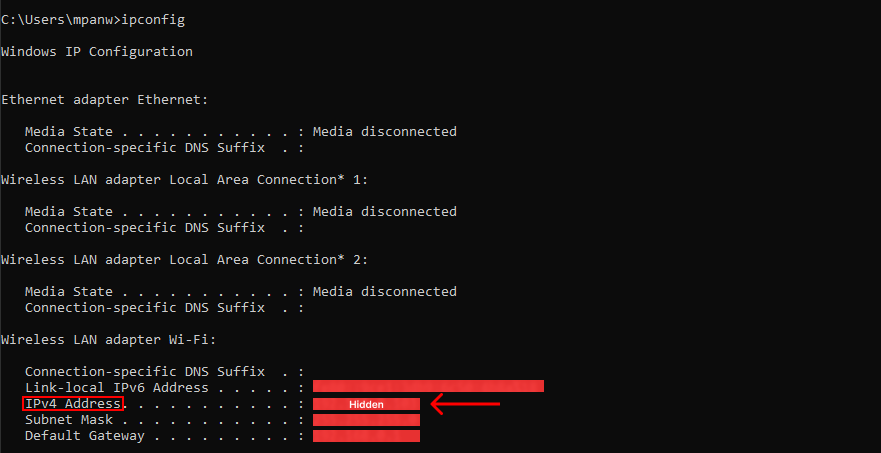
note down your local IP address IPv4.
Step 3 - Open browser on your mobile phone
we're almost done, now just open the browser on your mobile phone and type this in the search barIPv4 address:PORT (for example - 192.555.5.555:3000)
Step 4 - Give some love to this article 😁

Thank you so much for reading the whole article 😍.
Drop a like and comment if you found this article helpful🙏
and don't forget to share this crazy trick with your friends.
I am Mash Codee and feel free to connect with me on Twitter